
Employee Shift Scheduling Software
Four Controls That Power Our
Employee Shift Scheduling Software
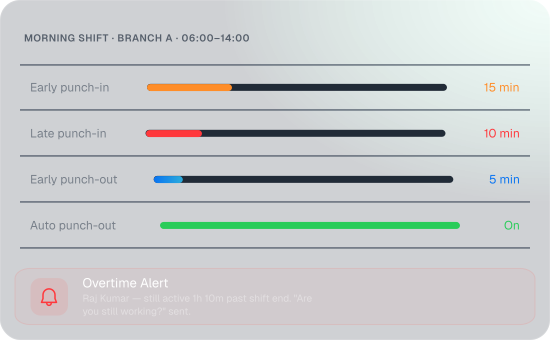
Shift Rules & Punch Buffers
Most shift scheduling software only tells people when to show up. FieldTrace decides what happens when they don't—with four buffers that govern every punch-in and punch-out.
- Set shift name, branch, start and end time, plus full-day and half-day working hours
- Early Punch-In — block clock-ins before the shift window opens
- Late Punch-In — allow a grace window, then flag every late arrival in Reports
- Early Punch-Out — allow early exits, but flag each one in Reports
- Late Punch-Out — auto punch-out anyone who forgets to clock out when overtime is off
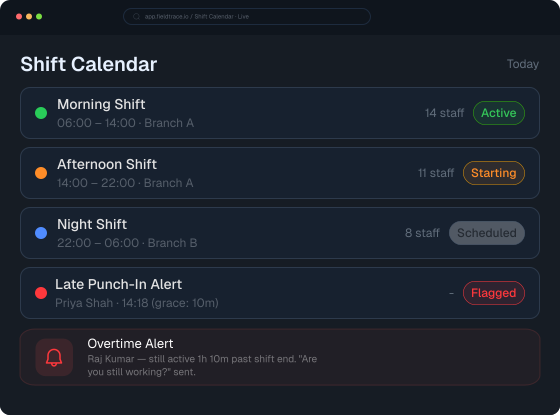
- Color-code every shift so your calendar reads at a glance
Overtime & Auto Punch-Out
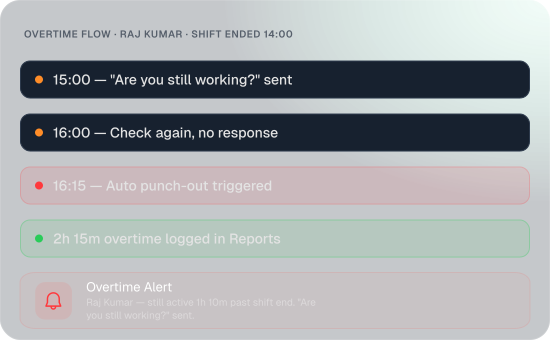
Overtime is where payroll quietly leaks. FieldTrace records every genuine extra hour—and keeps checking, hour by hour, that someone is still actually working.
- Allow or block overtime, shift by shift
- Overtime off — no work outside the shift window, with auto punch-out at the cutoff
- Overtime on — time past the shift end is recorded as overtime until punch-out
- An hourly "Are you still working?" push notification from the shift schedule app confirms the work is real
- No reply after a final 15-minute check? The system punches the user out
- Leaving the geofence, turning off location, or closing or uninstalling the app can trigger a punch-out
Shift Calendar & Shift Changes
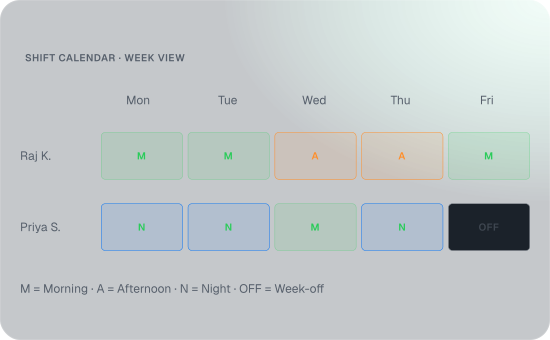
Your roster shouldn't live in a WhatsApp group. With FieldTrace's shift roster software, see every employee's shift for the week on one calendar—and change it without the phone calls.
- The Shift Calendar shows every employee's shift and week-offs, day by day
- Assign people in bulk by branch, department, and shift
- Reassign anyone by clicking their shift and picking a new one
- A change window blocks last-minute reassignments right before a shift starts
- Employees request changes from My Shift while admins approve or reject with a comment
- Every update reflects in the shift table instantly
Shift Rotation
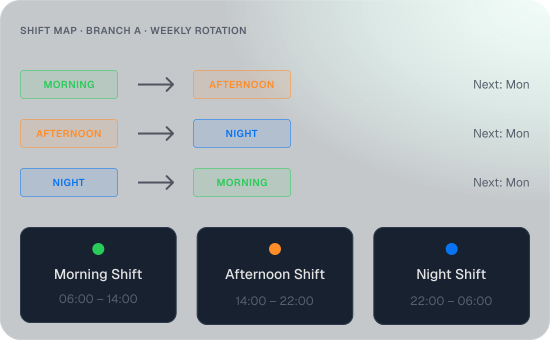
Rotating shifts by hand turns into a weekly argument. Map it once—Morning to Evening, Evening to Night, Night to Morning—and it runs itself.
- Rotate shifts daily, weekly, or monthly between a start and end date
- The Shift Map pre-fills every FROM shift at the branch—you just pick the TO
- Select individual users or everyone at once
- See the next switch date for every rotation
- Keep every employee moving fairly across every shift, automatically
The Real Payoff Of
Employee Shift Scheduling Software
Tidier attendance is the least of it. For field teams, employee scheduling software proves its worth in healthier margins, higher output, lower attrition, safer crews, and cleaner audits.

Overtime by Design
Keep overtime for the shifts that need it—and only while crews are actually working. At double wages, that precision protects margins.

No Gaps in Customer Coverage
Spot unstaffed shifts and branches before the day starts—not after a customer calls asking where your team is.

Field Teams That Stay
Predictable rosters, fair rotations, and a say in shift changes give your best field staff fewer reasons to leave.

Scale Without Extra Supervisors
Add branches, teams, and shifts without adding coordinators. Every new shift carries its rules from day one.

Audit-Ready Under the Labour Codes
Every shift, punch, overtime hour, and approval stays on record.

Stop Policing the Clock
Let Our Employee Shift Scheduling Software Do It

Frequently Asked
Questions
Find answers to common questions about FieldTrace's shift management software, including punch buffers, overtime tracking, shift changes, rotations, and automatic punch-outs.
Why use shift roster software instead of Excel sheets or WhatsApp groups?
A spreadsheet shows who should be on which shift, but it can't stop an early punch-in, flag a late one, or close a forgotten punch-out. FieldTrace connects the roster to every punch with rules applied automatically at clock-in and clock-out, employee requests go through approval, and rotations run on their own.
Can FieldTrace run rotating shifts for 24x7 operations?
Does it work for field staff who never report to an office?
Can employees request a shift change or swap?
How close to a shift can a manager still change it?
Can different branches follow different shift rules?